The brain: your memory vault
The vault is a folder of Markdown files, plain text with a little formatting, at
~/memory. Obsidian is a window onto those files; Claude reads and writes the same files
directly. Nothing about it is magic: every piece is a file you can open, read, and change.
Where the folder really lives depends on the platform:
- Windows: on the Windows drive at
Documents\Memory, so Obsidian on Windows opens it like any folder. Ubuntu reaches the same folder as~/memory, a link to it. - macOS: a real folder at
~/memory. In Obsidian, choose Open folder as vault and pickmemoryin your home folder. - Linux: a real folder at
~/memory.
Everything else in this tour refers to it as ~/memory.
The problems it solves
Every session starts blank. Claude remembers nothing from yesterday unless it is
written down somewhere it reads. The vault is that somewhere, and a hook hands Claude
the most important page of it, Bearing.md, before you type a word.
Claude Code's own memory is hidden by default. Out of the box, its automatic memory goes
to a hidden folder, ~/.claude/projects/<folder>/memory/, a separate one for each
project you work in, out of sight and not backed up. The installer points that automatic memory at the vault's
Auto Memory/ folder instead, so everything Claude remembers is in one place you can
read, search, correct, and back up.
Memory rots. Notes pile up, repeat each other, and go stale. A note from March that says "looking for remote roles" is still there in October, stated as fact, after you took a hybrid job. The vault keeps quick capture apart from the notes Claude relies on, and a regular tidy (the groom) moves what still matters across, deletes the rest, and flags notes nobody has checked in 90 days.
Too much memory crowds out the work. Everything Claude reads takes room in its context
window. So only two short things are loaded every session: Bearing.md, and the index
of raw capture, Auto Memory/MEMORY.md. Claude Code reads only the first 200 lines of
that index, another reason the groom keeps it short. Everything else is reached by following links
from Atlas.md when the work calls for it, the way you would look something up in a
binder.
An AI editing your important notes by mistake. A hook makes Claude ask before it changes any curated note, so a stray "update my notes" can't quietly rewrite the page that describes your job search.
Mistakes that stick. Every change is committed to git and, with the backup on, pushed to your private
memory repo on GitHub. "Undo the last groom" or "what did Bearing say last week?"
both work, because every old version is kept.
Being locked in. It is plain Markdown in a normal folder. Obsidian, Claude Desktop, Notepad, or whatever tool comes next can read it.
Pass --vault <path> to the installer to put it somewhere else; ~/memory then links
there.
What's in it
| File or folder | What it holds | Who writes it |
|---|---|---|
Bearing.md |
What is active right now; read at the start of every session | You and the groom |
Atlas.md |
The map: what each note and folder is for | You and the groom |
Projects Index.md, People Index.md, Decisions Index.md |
Lists of the project, person, and decision notes | Built from the notes' properties |
| Project and person notes | One note each, linked from the indexes | You and the groom |
Memories/ |
Lasting lessons: how you like things done, mistakes not to repeat | The groom |
Decisions/ |
One note per decision: what you chose, over what, and why | The groom |
Auto Memory/ |
Raw capture, plus MEMORY.md, its index |
Claude, during any session |
Daily/ |
One note per day, a diary the weekly review reads | You |
*.base files |
Live tables (active projects, notes due for review) | Obsidian, from note properties |
Each curated note starts with a few properties between --- lines: type (project,
person, decision, memory), status, and reviewed, the date someone last checked it.
The tables read those properties, so you change a note's status and every table that
lists it updates by itself.
The life of one fact
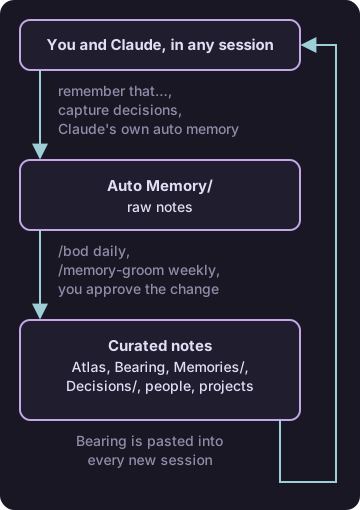
- In a job-search session you say "remember that I only want remote roles." Claude
writes a small file to
Auto Memory/and adds a line for it toMEMORY.md. - Next morning,
/bodruns the groom. It reads that file and proposes where it belongs, say a "Job search" project note, and shows you the exact change. - You say yes. The fact moves into the project note, the raw file is deleted, and the change is committed and, with the backup on, pushed.
- Weeks later, any session that needs your job-search preferences follows the link from Atlas to that project note and finds it.
- In December you say "I'm open to hybrid now." That lands in
Auto Memory/too, the groom spots that it contradicts the project note, and it either updates the note with the date or, when it can't tell which is right, lists the conflict under Watching inBearing.mdfor you to settle.
The rules that keep it useful
- A note earns its place by changing what a future session does. "I prefer short answers" earns it; a summary of yesterday's chat does not.
- Every fact is timeless, dated, or a link. "My sister is called Ana" is timeless. "Applying to three companies a week, as of October 2026" carries its date, so a later reader knows how old it is. A price or a schedule that changes weekly is a link to where the current one lives, never a copy.
- Keep
Bearing.mdandAtlas.mdshort. Bearing is read every session, so every line in it costs something every time; detail goes in a linked note. Daily/is a diary, never tidied. A fact you want kept from a day goes toAuto Memory/("remember that …"), because the groom never reads the diary.
The rhythm
- Morning: start Claude in
~/memoryand type/bod. It tidies yesterday's capture and tells you what is open. - During the day: say "remember that …" for a fact, "capture decisions" after a piece of work, and "capture this meeting" with your notes pasted after a meeting.
- Evening, if you like: write today's note in
Daily/in Obsidian. - Monday:
/weekly-reviewwrites up the week, then/memory-groomdoes the full tidy, including the notes due for review.
Skip a day and nothing breaks; the next groom picks up everything since the last one.
The hooks underneath
A hook is a small script Claude Code runs on its own at a set moment, whatever Claude
thinks. Instructions in CLAUDE.md are advice Claude follows; a hook is enforced. Both
of the vault's hooks live in ~/.claude/hooks/ and are switched on in
~/.claude/settings.json:
session-bearing.shruns when a session starts and pastes inBearing.md, plus any note taggedrepo: <account>/<name>for the git repo the session is in, whether a project note or aMemories/note. A note withrepo: <you>/job-searchin its properties is loaded only in job-search sessions.memory-write-zones.shruns before every file edit. If the edit is to a curated note, it makes Claude ask you first. During a groom it stays quiet, because the groom shows you the whole change at the end instead.
Using it in Obsidian
- Open the graph view (the branching icon in the left bar) to see how notes link.
- The backlinks panel on a note lists every note that links to it.
[[starts a link to another note; type part of its name and pick it.- Edit anything by hand. The hook only asks about Claude's edits, not yours. Then ask Claude to back up the vault.
- The tables in Bearing and the index notes fill themselves from note properties, so change the note, never the table.
~/memory/README.md is the vault's full rulebook, if you want every detail.